Lighter Deposit Not Showing? Deposit & Withdrawal Fixes
Table of Contents
- How do Lighter deposits actually work?
- Why is my Lighter deposit not showing?
- 1. The transaction is still confirming
- 2. Low gas left the transaction pending
- 3. Your wallet is connected to a different address
- 4. Wrong or unsupported asset
- 5. App display lag
- How do you verify a deposit on a block explorer?
- The deposit troubleshooting checklist
- Do withdrawals work the same way?
- Preventing stuck transfers next time
A deposit that doesn't show up in your balance is one of the more stomach-dropping moments in crypto. On a self-custody, verifiable exchange like Lighter, it's also one of the most recoverable. Almost every "stuck" deposit traces to a short list of predictable causes, and most of the time the funds are exactly where they should be: confirming on-chain, sitting at the address you sent from, or one refresh away from showing up. Below I cover why it happens, how to check what actually occurred, and a checklist to fix it.
On a self-custody DEX, a missing deposit is almost never "lost." Usually the funds are still confirming on Ethereum, waiting on gas, being viewed from the wrong connected address, or already settled and just not displayed yet. A block explorer is the source of truth, not the app. Deposits and withdrawals cost network gas, not a Lighter fee.
How do Lighter deposits actually work?
 Lighter
Lighter is a fully verifiable, self-custody perpetuals exchange built on custom ZK infrastructure that settles to Ethereum. That architecture matters when a deposit goes missing. On a centralized exchange you send funds to a custodial address and wait for an internal credit. On Lighter your deposit is an on-chain transaction you can verify yourself, and your funds are governed by on-chain mechanics rather than an opaque ledger.
The basics of funding an account:
- USDC is the primary collateral, and ETH can be used for multi-asset margin.
- Deposits and withdrawals are on-chain Ethereum transactions, so they need network gas and enough confirmations to be credited.
- Because trading is zero-fee on standard accounts, the gas you pay on a transfer is a network cost, not a Lighter fee.
Everything being on-chain is your biggest advantage when something looks wrong: it's all checkable.
Why is my Lighter deposit not showing?
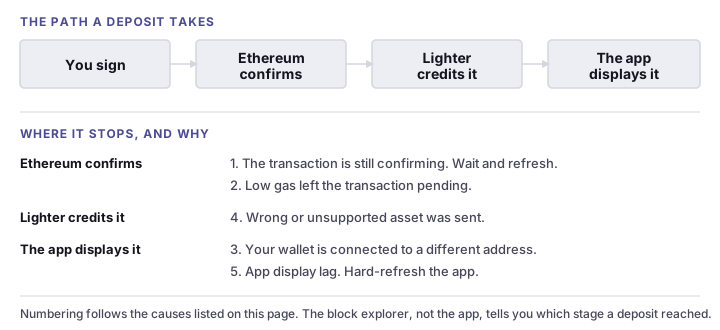
Before you act, know what you're looking for. These are the usual culprits, roughly in order of how often they come up. One thing they all assume is that you got as far as signing: if the wallet prompt never appeared in the first place, that is a different failure and it is covered in the sign message popup not showing.
1. The transaction is still confirming
The most common reason, and not really a problem. After you sign a deposit, Ethereum has to confirm it before the app credits your balance. During network congestion, or if you set a low gas fee, the transaction can sit pending for a while. If you deposited in the last few minutes and the network is busy, the fix is usually to wait and refresh.
2. Low gas left the transaction pending
Related but distinct. An underpriced transaction can stall in the mempool. It hasn't failed, it just hasn't been picked up. Keep enough ETH for gas and don't underprice, and you'll avoid this one.
3. Your wallet is connected to a different address
If you run multiple addresses or wallets, it's easy to deposit from one and then open the app connected to another. The balance lives with the address that signed and funded the deposit. Connect the wrong account and a perfectly successful deposit looks invisible.
4. Wrong or unsupported asset
Send an asset Lighter doesn't recognize as a supported deposit, like a lookalike token or a wrapped variant the app doesn't list, and the balance can go uncredited. Stick to supported collateral (USDC as primary, ETH for multi-asset margin) and double-check before sending.
5. App display lag
Sometimes the deposit has settled and credited, but the interface hasn't caught up. A stale session, a cached balance, or a wallet that quietly disconnected can make a real balance look absent. Reconnect and refresh to fix it. Do not send more funds.
Warning
Do not send a second deposit before you've verified the first on a block explorer. Sending again is the most common way people turn a five-minute wait into a genuine mess. Confirm status first, then act.
The same five causes, read from the symptom instead of the cause:
| What you see | Most likely cause | What to do |
|---|---|---|
| Deposited minutes ago, nothing in the balance | Still confirming | Wait for confirmations, then refresh |
| Wallet shows the transaction as pending | Low gas | Wait, or speed it up from the wallet. Do not resend |
| Explorer says confirmed, balance still empty | A different address is connected | Reconnect the exact address you sent from |
| Confirmed, right address, still empty | App display lag | Hard-refresh, or reconnect the session |
| Confirmed, but the token is not one Lighter lists | Wrong or unsupported asset | Contact support with the hash. Do not send more |
How do you verify a deposit on a block explorer?
This is the step that turns anxiety into information. A block explorer shows exactly what your transaction did, independent of the app. It's the one check worth doing before anything else.
Find your transaction hash
Open your wallet's activity or history and copy the transaction hash (a long string starting with 0x) for the deposit or withdrawal.
Open an Ethereum explorer
Paste the hash into an Ethereum block explorer such as Etherscan to look up the transaction, since Lighter settles to Ethereum.
Check the status
Confirm the transaction is marked success/confirmed, not pending or failed. A failed transaction means the funds never left your wallet (you only paid gas).
Verify from, to, asset and amount
Make sure the sending address is your wallet, the destination is the correct Lighter deposit target, and the token and amount match what you intended. A wrong asset or destination explains a missing credit.
Confirm the network and confirmations
Check that the transaction has enough confirmations. A recently-submitted transaction during congestion may simply need more time.
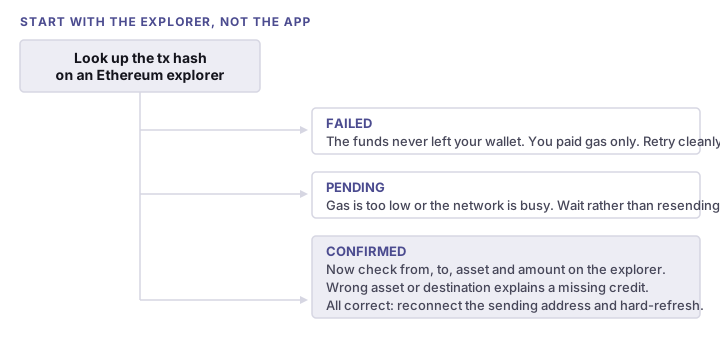
If the explorer shows the transaction confirmed, to the correct destination, with the right asset and amount, the deposit is real and your problem is almost certainly display lag or a wallet/address mismatch. Both are quick fixes. If it shows pending, wait. If it shows failed, the funds never moved and you can retry cleanly.
New to Lighter?
Signing up with code LIGHTERPEDIA applies the code automatically. Lighter’s referral documentation says new sign-ups are offered one week of Premium with trading fees rebated on the first $10M of volume, and that rebates are discretionary. Standard accounts trade at 0% maker and taker either way.
Start Trading on LighterThe deposit troubleshooting checklist
Work through these in order. Most stuck deposits resolve by step 4 without contacting anyone.
-
Reconnect your wallet. Disconnect in the app, then reconnect the exact wallet and address you deposited from. A surprising share of "missing" deposits are just the wrong account being viewed.
-
Confirm the network. Make sure your wallet is on the correct Ethereum network and matches what the app expects for the deposit.
-
Hard-refresh the app. Do a full reload (not just a tab switch) to clear a stale balance. If needed, clear the site cache for the Lighter app and reload.
-
Give it a few minutes. If the transaction is recent, especially during Ethereum congestion, allow time for confirmations, then refresh again.
-
Look it up on a block explorer. Use the steps above to establish ground truth: confirmed, pending, or failed. Don't skip this. It tells you whether to wait, act, or stop worrying.
-
Check the asset and amount. Confirm you deposited a supported asset (USDC or ETH) of a normal size, not a lookalike token or a dust amount.
-
Check your gas. If the transaction is stuck pending on low gas, that's a network issue, not a Lighter one. Wait for it to clear or drop, and keep ETH on hand next time.
-
Gather details and contact support. Only if the explorer shows the transaction confirmed to the correct destination and the balance still hasn't appeared after a reasonable wait, collect the transaction hash, wallet address, asset, and amount, and reach out to Lighter support to trace it.
The order matters: reconnect and refresh first (free and instant), verify on a block explorer second (the truth), and contact support last, with the transaction hash in hand. Sending a second deposit before verifying the first is the classic way to turn one problem into two.
Do withdrawals work the same way?
A withdrawal is just an on-chain transaction moving funds back to your wallet, so it follows the same rules. It depends on Ethereum confirmations and gas, and a block explorer is again the source of truth. If a withdrawal seems stuck, check the transaction hash before you start worrying.
There's also a deeper backstop worth knowing about. Because Lighter is verifiable and self-custody, it has an Escape Hatch. If the sequencer ever stalls, the core contract can be frozen, and you can reconstruct your account state directly from Ethereum data and withdraw without the operator's cooperation. Your ability to get funds out does not depend on Lighter staying online. We cover this in full in is Lighter safe.
Preventing stuck transfers next time
A few habits kill most of the headaches:
- Keep ETH for gas so deposits and withdrawals confirm promptly.
- Use one dedicated wallet and address as your trading account, so you're never staring at the wrong balance.
- Stick to supported assets (USDC as primary collateral, ETH for margin).
- Deposit a small test amount first when using a new wallet or setup.
- Verify before re-sending. Always check the explorer before signing a second transaction.
Once your funds are showing, learn the cost side in Lighter fees explained (standard trading is zero-fee), start earning toward the airdrop in the points program, and if you're setting up a second wallet or want the happy path start to finish, the deposit walkthrough covers connecting, bridging and funding in order. Here's the reassuring part: the same property that makes a missing deposit feel scary is what makes it fixable. You hold the keys, and Ethereum keeps an honest record of where every coin went.
Ready to trade on Lighter?
Signing up with code LIGHTERPEDIA applies the code automatically. Lighter’s referral documentation says new sign-ups are offered one week of Premium with trading fees rebated on the first $10M of volume, and that rebates are discretionary. Standard accounts trade at 0% maker and taker either way.
Start Trading on LighterCite this page
These figures are free to quote. Copy the citation or the link below.
Plain-text citation
Lighterpedia. "Lighter Deposit Not Showing? Deposit & Withdrawal Fixes." Published July 5, 2026, updated September 8, 2026. https://lighterpedia.com/troubleshooting/lighter-deposit-not-showingHTML link
<a href="https://lighterpedia.com/troubleshooting/lighter-deposit-not-showing">Lighter Deposit Not Showing? Deposit & Withdrawal Fixes — Lighterpedia</a>Methodology and reuse
The deposit mechanics on this page — USDC as primary collateral, ETH for multi-asset margin, Ethereum settlement, gas as a network cost rather than a Lighter fee, and the Escape Hatch withdrawal path — are stated as Lighter documents them. The diagnostic steps apply to the Ethereum deposit path the app uses and were last reviewed against the live app on the date shown above. They were read from the Lighter documentation on and re-verified against the live app. Exchanges change their schedules, so treat any figure older than that date as needing a fresh check — the date above is the one to compare against.
You may republish these figures with attribution and a link to https://lighterpedia.com/troubleshooting/lighter-deposit-not-showing.
Frequently Asked Questions
The most common reasons are that the Ethereum transaction is still waiting for confirmations, you paid too little gas so it's pending, your wallet is connected to a different address than the one you funded, you sent an unsupported asset, or the app is simply showing a stale balance. Lighter is self-custody and settles on-chain, so check the transaction on a block explorer to confirm what actually happened before assuming funds are lost.
A deposit usually appears once the Ethereum transaction has enough confirmations, which can be quick when the network is calm and noticeably slower during congestion or if you set a low gas fee. If a block explorer shows the transaction confirmed but your balance hasn't updated after a reasonable wait, reconnect the exact wallet and address you deposited from and hard-refresh the app.
Lighter's standard trading is zero-fee, but deposits and withdrawals are on-chain actions that cost Ethereum network gas, which Lighter does not control or collect. A deposit that seems 'short' is usually just the network gas you paid, not a Lighter fee. Keep some ETH in your wallet so deposit and withdrawal transactions can confirm.
A withdrawal is an on-chain transaction back to your wallet, so it depends on Ethereum confirmations and gas just like a deposit. Check the transaction hash on a block explorer to confirm status. In the rare event the sequencer has stalled, Lighter's Escape Hatch lets you reconstruct your account from Ethereum data and withdraw directly, a backstop that exists so you can always exit.
Reconnect the exact wallet and address you deposited from, then hard-refresh the app to clear a stale balance. Confirm you're on the same network. If the transaction is confirmed to the correct destination and the balance still hasn't appeared after waiting, gather the transaction hash, your wallet address, the asset, and the amount, and contact Lighter support so they can trace it.
Lighterpedia is an independent, unofficial resource. It is not affiliated with, produced by, reviewed by, endorsed by, or sponsored by Elliot Technologies, Inc., Lighter, Inc., or any of their affiliates. "Lighter" and the Lighter logo are trademarks of their respective owners, used here only to identify the platform this site writes about. For official information, go to lighter.xyz.
Nothing on this site is legal, tax, financial, or investment advice. Trading perpetual futures with leverage can lose you more than you deposit. Rules differ by jurisdiction and change often — check the primary sources and a qualified professional before acting on anything you read here.
This site contains referral links — see the disclosure in the author note above and our full disclaimer.
Ready to Start Trading?
Signing up with code LIGHTERPEDIA applies the code automatically. Lighter’s referral documentation says new sign-ups are offered one week of Premium with trading fees rebated on the first $10M of volume, and that rebates are discretionary. Standard accounts trade at 0% maker and taker either way.
Start Trading on Lighter